Folders that clean themselves.
Give ordinary Finder folders opt-in capabilities with one right-click. Your Downloads, scratch folders, and exports stay clean — automatically.

The Folder is the Interface
No rules engine. One right-click.
DirBuff turns any ordinary folder into a self-cleaning buffer without moving your files into special silos or teaching you a complex condition builder.
Right-click in Finder
Right-click any folder you already use — Downloads, a screenshots folder, or an exports folder — and choose DirBuff: Make Temporary… (Folders in iCloud Drive are added with + in DirBuff’s window.)
Marked with a Finder Tag
DirBuff tags the folder with DirBuff: Temporary. The tag is visible across Finder, survives moves and renames, and syncs via iCloud.
Runs quietly in menu bar
DirBuff checks hourly. When rules qualify old files, they are safely cleaned up. If you ever remove the tag, DirBuff stops immediately.
Temporary Capability
Four sensible rules. Any one fires.
Configure only what you need. Sensible defaults mean you never have to tweak settings unless you want to.
1. Age
Removes items that haven't arrived or changed for a set number of days (default: 90 days). Freshness is the later of date added and date modified, so dropping a file in or editing it restarts its clock.
2. Size
Keeps the folder under a total size cap (e.g. 10 GB). When the folder exceeds the limit, the oldest items are cleared first until it fits within your limit.
3. Automatic
Like /tmp for macOS: keeps everything as long as your disk has room. When free space drops below 10%, the oldest items are purged (requires Delete permanently).
4. Empty on Restart
The first run after a Mac reboot clears what was left behind. Useful for scratch holding areas, test directories, and temporary unpack destinations.
Safety & Privacy
Clear rules. Complete control.
Because DirBuff removes files, every safety feature is built for control, transparency, and instant reversibility.
✓ Move to Bin by Default (Put Back)
Files are sent to the macOS Bin, never deleted permanently without your explicit choice. You can restore any item with Finder’s native Put Back or right from DirBuff’s menu.
✓ The Forecast View
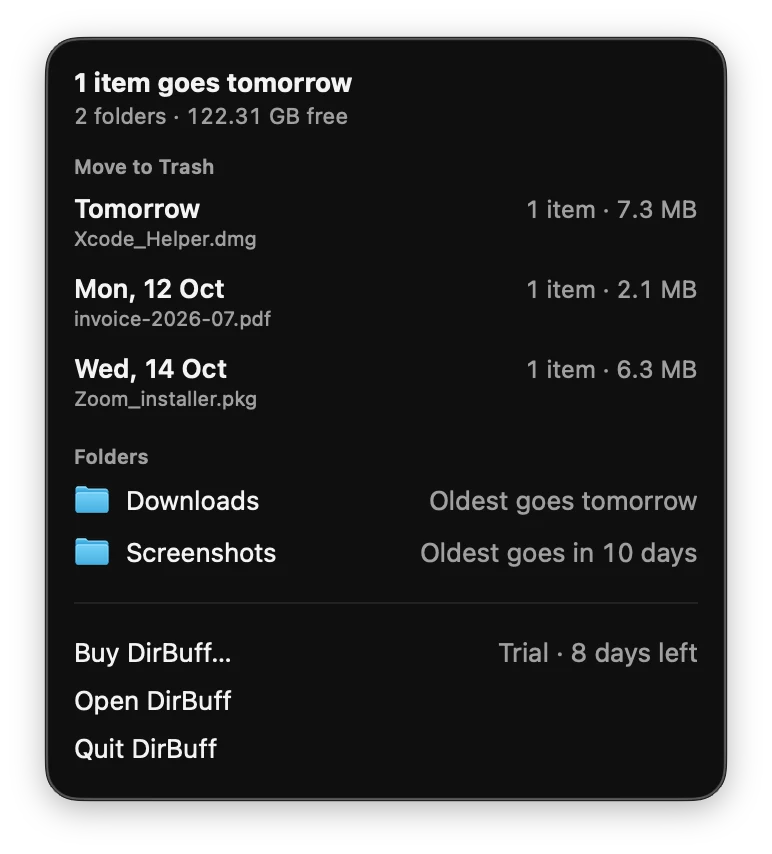
DirBuff tells you what goes, when, and whether it can come back ("Nothing goes today", "3 items go tomorrow").
✓ On-Device & Private
Your files and folder names never leave your Mac. To check your licence, DirBuff sends Polar your licence key, your Mac’s name and an anonymous ID for the Mac.
✓ Guarded Roots & Fail Safe
Protected folders (~, /, ~/Documents, ~/Desktop, ~/Library, and volume roots) can never be made temporary.
Pricing
Try free for 14 days.
No credit card needed to begin. Pay once a month or once a year through Polar.
or £3 / €3 per month
- ✓ 14-day full-feature free trial
- ✓ All Temporary capability rules
- ✓ Unlimited monitored folders
- ✓ Direct download & Sparkle updates
or £30 / €30 per year
- ✓ 14-day full-feature free trial
- ✓ All Temporary capability rules
- ✓ Unlimited monitored folders
- ✓ Direct download & Sparkle updates